azure.microsoft.com
Cloud can be tricky sometimes. Find out what scenarios we've ran into that are worth being mentioned and explained.
Cost control matters everywhere—whether you’re managing household expenses or running workloads in the cloud.
In Azure, Microsoft provides several native tools to help you keep spending in check, including Azure Advisor and cost alerts. Alongside these, the Azure FinOps Toolkit offers additional resources designed specifically to support cost visibility and financial accountability in the cloud.
In this article, we’ll explore key components of the Azure FinOps Toolkit that you can deploy to better monitor and optimize your Azure spend.
What is the Azure FinOps Toolkit?
The Azure FinOps Toolkit is a collection of open-source tools designed to help organizations manage Azure costs and adopt FinOps best practices. It includes prebuilt alerts, Azure Workbooks, and Power BI reports that provide visibility into spending and usage patterns.
While the toolkit is owned and maintained by Microsoft, it has benefited from ongoing contributions from the wider community.
If you’re just getting started with cost optimization, there are two components in the toolkit that provide immediate value and are worth deploying first.
_______________________________________________________________________________
Using FinOps Toolkit Alerts to Reduce Azure Costs
One of the most useful resources in the toolkit is FinOps Alerts. This is delivered as a Logic App that runs on a schedule and scans your environment for resources that may be generating unnecessary costs, including:
• Unused Application Gateways
• Unattached or idle disks
• Idle public IP addresses
• Unused load balancers
• Disk snapshots older than 30 days
• Virtual machines that are stopped but still incurring charges
The Logic App checks the subscriptions you specify and, when it detects any of these conditions, sends an email notification. This can be directed to a member of your team or your IT service desk so action can be taken.
The deployment is lightweight and can typically be completed in under ten minutes.
_______________________________________________________________________________
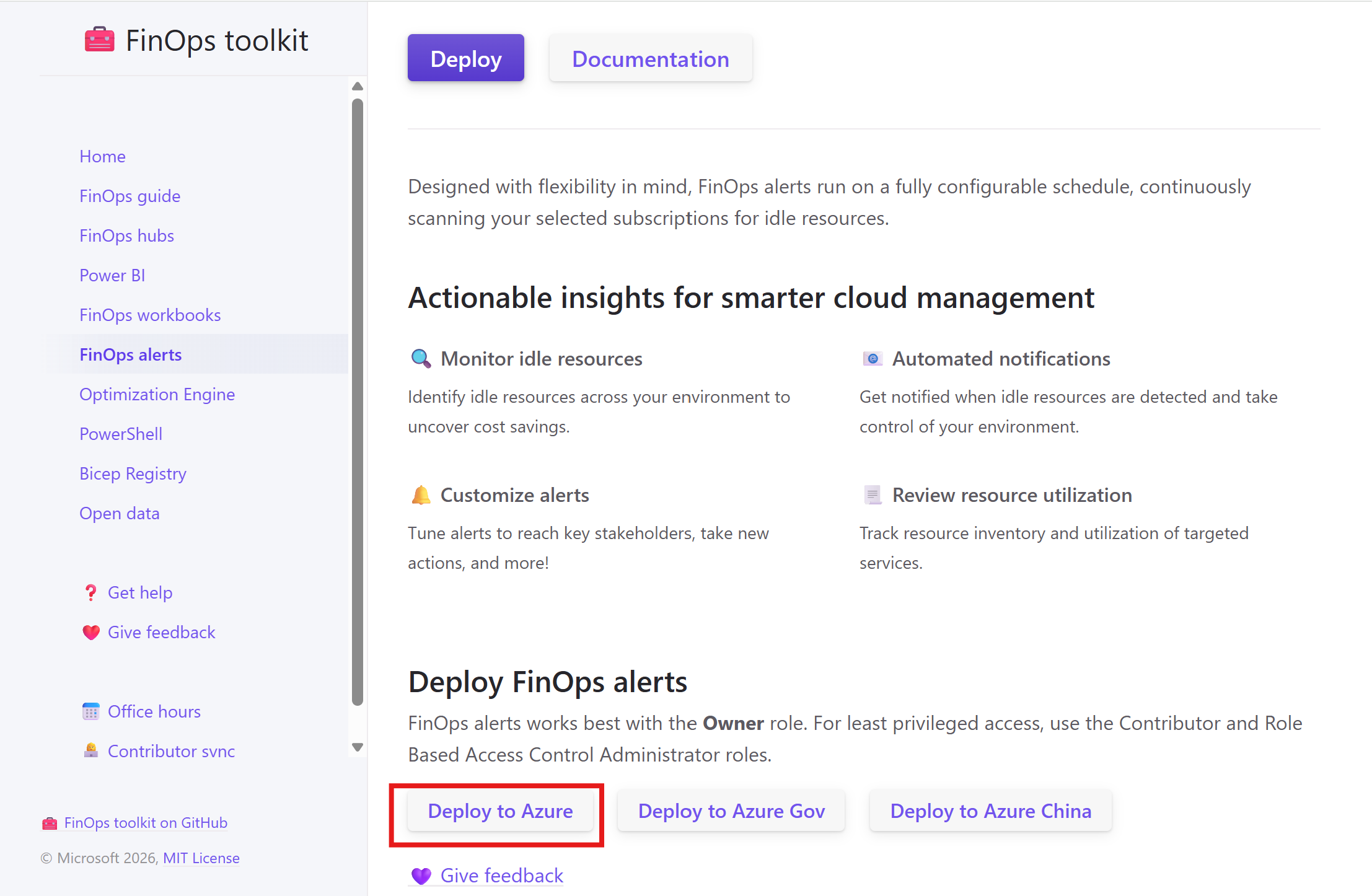
Deploying FinOps Alerts
Start by navigating to:
https://microsoft.github.io/finops-toolkit/alerts#deploy
Select the appropriate Deploy option—here, we’ll use Deploy to Azure.
This opens a custom ARM template deployment in the Azure portal. You’ll be prompted to choose:
• The Azure subscription
• A resource group
• The Azure region
• A name for the Logic App
After entering the required details, select Review + Create, then Create to begin the deployment.
Once the deployment finishes, some additional configuration is required before the Logic App can run successfully.
Open the Logic App and select Edit.
Within the Recurrence step, you can adjust how frequently the Logic App runs. By default, it executes once per week.
Next, open Set alert recipient and enter the email address that should receive the notifications.
Then, locate Included subscriptions and provide the subscription ID—or IDs—that should be scanned.
For a single subscription, use the following format:
["12345678-aaaa-bbbb-cccc-1234567890ab"]
For multiple subscriptions, use:
[
"11111111-1111-1111-1111-111111111111",
"22222222-2222-2222-2222-222222222222",
"33333333-3333-3333-3333-333333333333"
]
If there are subscriptions you don’t want included, add them to the Excluded subscriptions section.
Scroll to the bottom of the Logic App and open the Send an email (V2) step. Choose Change connection, then Add new, and sign in with your Microsoft 365 account to authorize email delivery.
Be sure to click Save once all changes are complete.
You can now trigger the Logic App manually by selecting Run.
_______________________________________________________________________________
Analyzing Azure Spend with FinOps Toolkit Workbooks
Azure Workbooks offer an interactive way to visualize and analyze data. The Azure FinOps Toolkit includes two primary workbooks: Optimization and Governance.
The Optimization workbook provides insights into resource usage and cost efficiency, aligned with the Cost Optimization pillar of the Azure Well-Architected Framework.
The Governance workbook focuses on policy, compliance, and overall governance posture across your Azure environment.
To deploy the workbooks, visit:
https://microsoft.github.io/finops-toolkit/workbooks
Click the Deploy button that fits your scenario—again, we’ll use Deploy to Azure.
This launches another custom ARM template deployment in the Azure portal. You’ll be asked to select:
• A subscription
• A resource group
• An Azure region
• A prefix to apply to the workbook names
Select Review + Create, then Create to start the deployment.
After a few minutes, the workbooks will be available in your deployed resources. From there, you can open them and begin exploring the data.
These workbooks are excellent tools for identifying governance gaps and uncovering opportunities to reduce costs and improve efficiency.
_______________________________________________________________________________
Final Thoughts on Azure Cost Optimization
The Azure FinOps Toolkit brings together a powerful set of resources to help you implement FinOps practices and maintain cost discipline in Azure. Even by deploying only the alerts and workbooks, you can quickly surface unused resources, identify savings opportunities, and gain better control over cloud spending.
Spend some time exploring the toolkit and tailoring it to your organization’s needs. Proactive cost monitoring not only helps reduce expenses but also improves visibility and accountability—key foundations for running a more efficient and sustainable cloud environment.

Transform your business.
Run adaptive.
Phone: +40 73 523 0005
Email: hello@adaptive.run