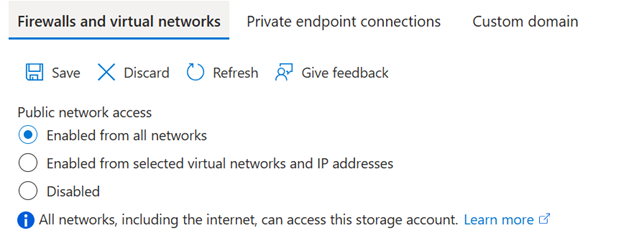
A major drawback of this approach is that these settings are applied individually to each resource. As the number of PaaS resources grows, so does the operational overhead required to configure, maintain, and audit network security rules.
This is the gap that Network Security Perimeter is designed to fill. Much like Azure Firewall Manager or Azure Virtual Network Manager, NSP enables you to define security policies centrally and apply them across multiple managed resources. This centralised model simplifies policy management and helps ensure consistent enforcement throughout your environment.
Another key capability is the ability to define multiple network security perimeters. This allows you to group related PaaS resources together and explicitly permit or block traffic between different perimeters. Conceptually, this is similar to an n-tier architecture, where application layers are segmented and isolated from one another.
NSP can manage both inbound and outbound traffic for PaaS services, giving you tighter control over data flows and ensuring that only approved traffic is allowed in or out.
Because NSP is still in preview, there are currently several constraints—most notably around supported services and scalability. A detailed list of these limitations is available in the official documentation.
At present, NSP supports the following Azure services:
• Application Insights
• Alerts, Notification Service
• Azure AI Search
• Cosmos DB
• Event Hubs
• Key Vault
• Log Analytics Workspace
• SQL Database
• Storage
Deploying an NSP resource is relatively simple. At the moment, you must first register the appropriate preview feature before deployment. Once enabled, a single NSP can manage resources across multiple Azure regions.
In some environments, one NSP may be sufficient. However, from a security and manageability standpoint, it’s generally recommended to deploy a separate NSP per application or workload.
Security configuration within NSP is handled through profiles. A profile consists of inbound and outbound access rules and can be associated with one or more Azure resources. If a different set of rules is required, you can create an additional profile—up to 200 profiles are supported per NSP.
Logging is configured at the NSP level and introduces a wide range of new diagnostic signals, including:
• Public inbound access allowed by NSP rules
• Public inbound access denied by NSP rules
• Public outbound access allowed by NSP rules
• Public outbound access denied by NSP rules
• Inbound access allowed within the same perimeter
• Public inbound access allowed by PaaS resource rules
• Public inbound access denied by PaaS resource rules
• Public outbound access allowed by PaaS resource rules
• Public outbound access denied by PaaS resource rules
• Private endpoint traffic allowed
• Cross-perimeter outbound access allowed via perimeter links
• Cross-perimeter inbound access allowed via perimeter links
• Outbound traffic attempted to the same or a different perimeter
As noted earlier, profiles are where access policies are defined. You can attach multiple resources to a single profile or create several profiles within the same NSP, depending on your needs. Essentially, a profile represents a logical grouping of access rules.
Inbound rules allow you to specify trusted IP addresses and/or trusted Azure subscriptions. These trusted subscriptions can access all resources associated with the profile at the subscription level*. Currently, this is the finest level of granularity available, though the Azure portal hints at potential future support for explicitly allowing access between NSP-protected resources.
Outbound rules are more limited at this stage and only support specifying permitted destination FQDNs. One noteworthy detail is that resources associated with the same NSP are implicitly trusted and do not require explicit outbound rules to communicate with each other*. This has important design implications—using a single NSP for multiple workloads could unintentionally introduce trust relationships that you may not want.
*To enable this functionality, a managed identity is required. Without it, outbound traffic to resources within the same perimeter or across linked perimeters will be blocked.
Network Security Perimeter supports multiple access modes to help organizations gradually move from traditional public access controls to NSP-based enforcement. This is conceptually similar to the detection and prevention modes used by Azure WAF.
- Learning mode
In learning mode, NSP observes and logs traffic to your PaaS services without actively blocking it. Existing network or firewall rules configured directly on the PaaS resource remain in effect. This mode is ideal during early adoption, as it provides visibility into traffic patterns and helps validate policy design.
While in this mode, you can enable or disable public endpoint access centrally via NSP instead of configuring each resource individually. NSP rules are evaluated first; if no match is found, the system falls back to the PaaS resource’s own network rules. NSP logs can then be used to confirm whether profiles are correctly configured.
- SecuredByPerimeter mode
A third option, SecuredByPerimeter, shifts full evaluation responsibility to the NSP profile. Selecting this mode indicates that inbound and outbound access is now governed entirely by NSP, rather than by individual PaaS resource settings.
- Enforced mode
After analysing logs and refining your policies, you can move to enforced mode. In this state, NSP actively blocks any traffic that does not comply with defined rules. Once enforcement is enabled, any network security settings configured directly on the PaaS resource are ignored and cannot override NSP policies.
NSP also allows you to control public network access on a per-resource basis within a profile. This makes it possible to transition resources to NSP management incrementally, rather than all at once.